Streamlining Python Environment Management in VS Code: The New Environments Extension
Introduction
Python development in Visual Studio Code has long been a rich experience, but managing environments—those isolated spaces where interpreters and packages live—often felt fragmented. Developers juggled tools like venv, conda, pyenv, poetry, and pipenv, each with its own commands and quirks. The new Python Environments Extension aims to bring clarity and consistency to this part of the workflow. After a year in preview—refined through community feedback and real-world testing—the extension is now generally available. In the coming weeks, users will automatically transition to this unified interface, or they can opt in immediately by setting python.useEnvsExtension to true. The extension works seamlessly alongside the core Python extension, requiring no setup: just open a Python file, and your environments are discovered automatically.
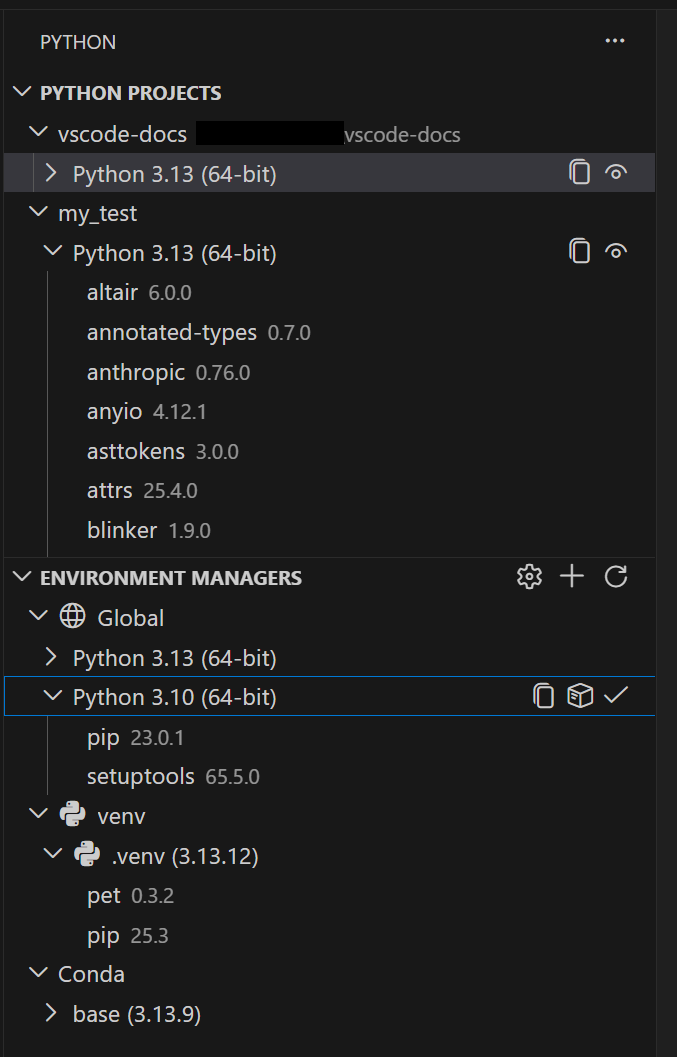
A Unified Environment Experience
The extension automatically discovers environments from all major managers, including venv, conda, pyenv, poetry, pipenv, and system Python installs. This discovery is powered by PET (Python Environment Tool), a fast Rust-based scanner that reliably finds environments across operating systems by checking your PATH, known installation directories, and any configurable search paths. PET has already been the engine behind environment discovery in the core Python extension, so this is a proven technology now wrapped in a dedicated user interface. From a single view, you can create, delete, switch, and manage environments—regardless of which tool originally created them.
Automatic Discovery with PET
For most developers, everything works out of the box. PET scans your system efficiently, detecting environments in standard locations. If you have environments in non-standard directories, you can configure workspace-level search paths using glob patterns. For shared directories outside your workspace, global search paths can be set, ensuring even complex setups are covered.
Faster Environment Creation with uv
Creating new environments is often the first step in any Python project, and the extension makes it significantly faster by leveraging uv—a modern, ultra-fast package installer and resolver. If uv is installed on your system, the extension uses it automatically for creating venv environments and installing packages. This is enabled by default via the python-envs.alwaysUseUv setting. The speed improvement is especially noticeable in large projects with many dependencies.
Quick Create
Getting a new environment up and running is now just a click away. The Quick Create feature (the + button in the Environment Managers view) builds an environment using your default manager, the latest Python version, and any workspace dependencies it finds in requirements.txt or pyproject.toml. In seconds, you have a fully working environment ready for development.

Custom Create
When you need more control, the Custom Create option (available via the Command Palette as Python: Create Environment) lets you choose your environment manager, Python version, environment name, and which dependency files to install from. Both venv and conda support creating environments directly from VS Code. For other managers like pyenv, poetry, and pipenv, the extension discovers environments you create with their respective CLI tools, allowing you to continue using your preferred workflows while benefiting from a unified management view.
Python Projects: Environments That Match Your Code Structure
One of the most powerful features of the extension is Python Projects, which lets you map environments to specific folders or files. This solves a common challenge in monorepo setups, where different parts of the codebase may require distinct Python versions or dependency sets. By assigning environments to particular project roots, you ensure that each component gets the right interpreter and packages without manual switching. The extension automatically associates environments with the workspace structure, making it easy to navigate multi-project workspaces.
Conclusion
The Python Environments Extension for VS Code transforms environment management from a fragmented, tool-specific chore into a streamlined, unified experience. With automatic discovery powered by PET, faster creation using uv, and intuitive features like Quick Create, Custom Create, and Python Projects, it significantly reduces friction for Python developers. Whether you’re working on a single script or a large monorepo, this extension helps you focus on code instead of environment configuration.