Ubuntu Pro Integration in Security Center: A Q&A Guide
With the release of Ubuntu 26.04 LTS, Canonical has streamlined the process of enabling Ubuntu Pro by moving its settings into the Security Center app. This guide answers common questions about the new setup experience, pricing, and enrollment improvements. If you're wondering about the specific changes or who qualifies for free access, keep reading.
1. What changes did Ubuntu 26.04 LTS introduce for Ubuntu Pro setup?
Ubuntu 26.04 LTS removed the traditional Software & Updates utility from default installations. In its place, Canonical integrated Ubuntu Pro configuration directly into the Security Center application. This move consolidates security settings in one place, making it easier for users to manage subscriptions and updates. The previous method required navigating to a separate tab within Software & Updates, which felt cramped and less intuitive. Now, the entire process resides within the Security Center, which already handles other security features like firewall and automatic updates. The transition aims to reduce confusion and centralize control, reflecting a broader trend in Ubuntu toward unified system settings.

2. How does the new Security Center interface compare to the old one?
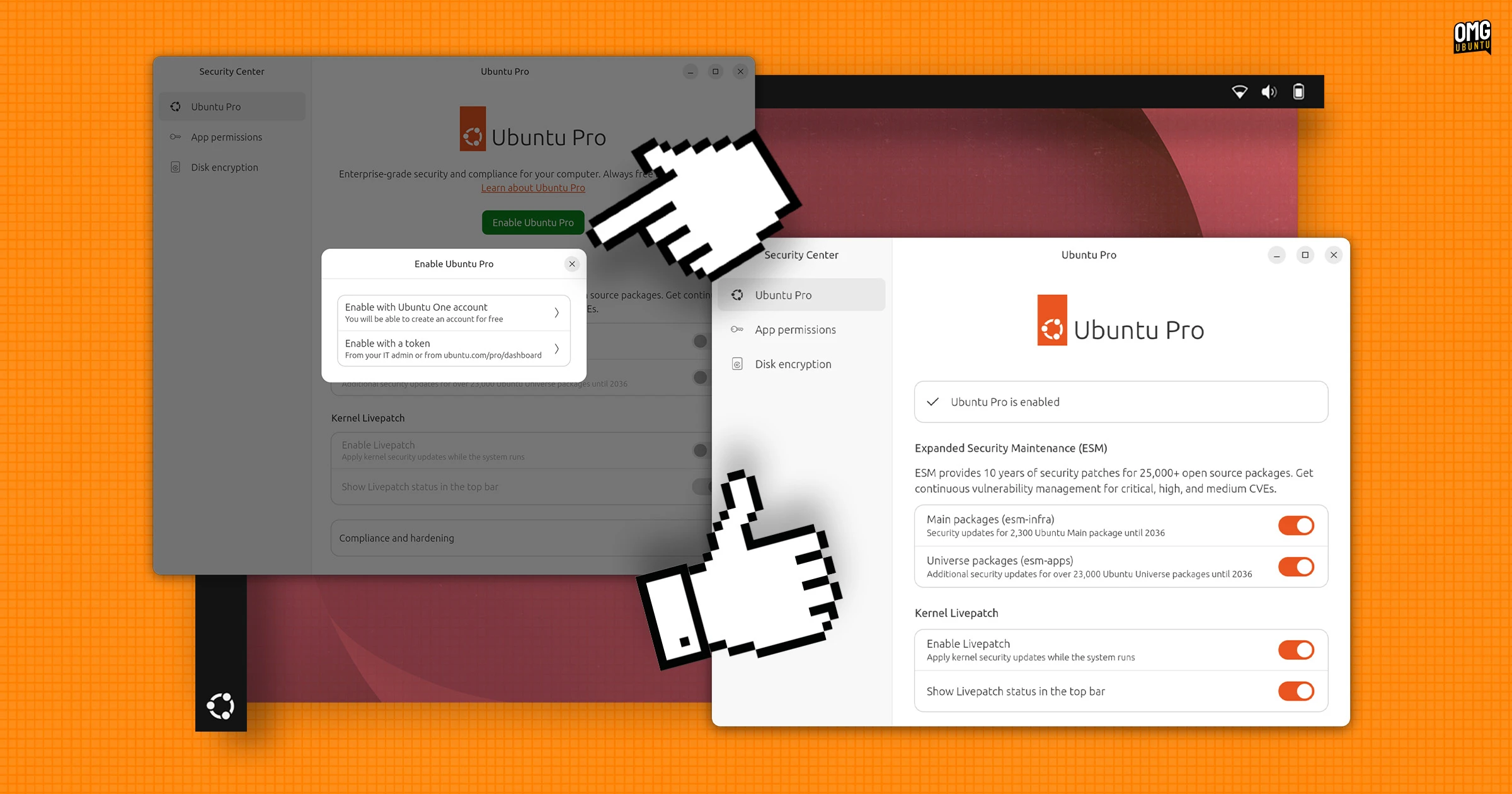
The new interface in Security Center is notably less cramped than the old Software & Updates > Ubuntu Pro tab. Options are presented with more generous spacing, and each toggle or setting includes concise explanations of its purpose. Previously, users saw a dense list of checkboxes and dropdowns without much context. Now, descriptions help clarify what each feature does—for example, what enabling ESM (Extended Security Maintenance) means for your system. The layout prioritizes readability, making it simpler for both beginners and experienced users to understand the implications of their choices. The overall experience feels more modern and user-friendly, aligning with Ubuntu's goal of improving desktop usability.
3. Is Ubuntu Pro free, and what are the usage limits?
Yes, Ubuntu Pro is free for personal use on up to five devices. This tier provides access to essential security patches, including ESM for older LTS versions, along with tools like Landscape for system management. The free subscription is ideal for individual users or small-scale personal projects. However, the license does not cover commercial or organizational deployments. Each device must be registered with a free Ubuntu One account, and the limit applies to the total number of machines linked to that account. If you attempt to enroll a sixth device, you'll be prompted to either upgrade to a paid plan or remove an existing device from your free subscription.
4. Who needs a paid subscription for Ubuntu Pro?
A paid subscription is required for businesses, enterprises, or any organization managing multiple Ubuntu installations. The paid plans offer additional features such as advanced compliance reporting, 24/7 phone support, and access to a wider range of security updates. They also remove the five-device cap, allowing unlimited enrollment across a fleet. For companies that rely on Ubuntu in production environments, the subscription ensures they receive timely patches and regulatory compliance. Small teams or startups may also opt for paid subscriptions if they need more than five devices under management. Pricing scales based on the number of machines and the level of support needed.
5. How has the enrollment process improved in Security Center?
Enrolling your system in Ubuntu Pro via Security Center is now simpler and more streamlined. Previous versions required opening Software & Updates, navigating to the Ubuntu Pro tab, and manually entering an authentication token or logging into your Ubuntu account through a hyperlink. The new process reduces steps: once you open Security Center, you see a dedicated Ubuntu Pro section with a clear “Set up Ubuntu Pro” button. Clicking it prompts you to sign in with your Ubuntu One credentials directly within the app. After authentication, the system automatically activates the subscription for that device. The entire flow feels faster and more integrated, with fewer opportunities for user error.
6. What settings are available in the new Ubuntu Pro section?
The new Ubuntu Pro section within Security Center offers a range of options that mirror what was previously found in Software & Updates. Users can toggle features like ESM (Extended Security Maintenance), Livepatch (for automatic kernel updates without reboots), and FIPS (Federal Information Processing Standards) compliance. Each setting includes a brief description of its benefits and requirements. There's also a clear indicator showing whether the device is currently covered by a Pro subscription and how many devices are enrolled under the same account. Managing these settings requires minimal technical knowledge, as the interface provides guidance and links to documentation when needed.
7. Why did Canonical move Ubuntu Pro settings to Security Center?
Canonical's decision to relocate Ubuntu Pro settings to the Security Center stems from a desire to centralize security management. The Security Center already handles firewall configuration, software updates, and threat alerts. Adding Ubuntu Pro to this app ensures users can find all security-related options in one place, rather than jumping between different tools. This consolidation also reduces clutter in the main Settings application and improves discoverability. Moreover, the Security Center's modern interface allows for better layout and explanatory text, making complex subscription options more accessible. For power users, the change reflects a logical grouping of features that share a common goal: keeping Ubuntu systems secure with minimal effort.