10 Game-Changing Features in IBM Vault 2.0 That Simplify Secrets Management
IBM Vault 2.0 marks a significant leap forward in secrets management, shifting from a tool that required deep expertise to one that prioritizes ease of use and operational transparency. With a redesigned user interface and enhanced reporting capabilities, this release empowers organizations to onboard faster, adopt best practices intuitively, and gain unprecedented visibility into how Vault is utilized across secrets, keys, identities, and data protection. Below are ten key enhancements that make Vault 2.0 a must-have for any security-conscious team.
1. A Fresh Focus on Usability and Onboarding
The entire design philosophy behind Vault 2.0 revolves around reducing the learning curve. Instead of forcing users to become Vault experts through scattered documentation, the new UI proactively guides them. The goal is to help customers easily discover and understand features without needing a PhD in Vault. This holistic reassessment means that even newcomers can start managing secrets effectively from day one, with contextual prompts and intuitive workflows that eliminate guesswork.
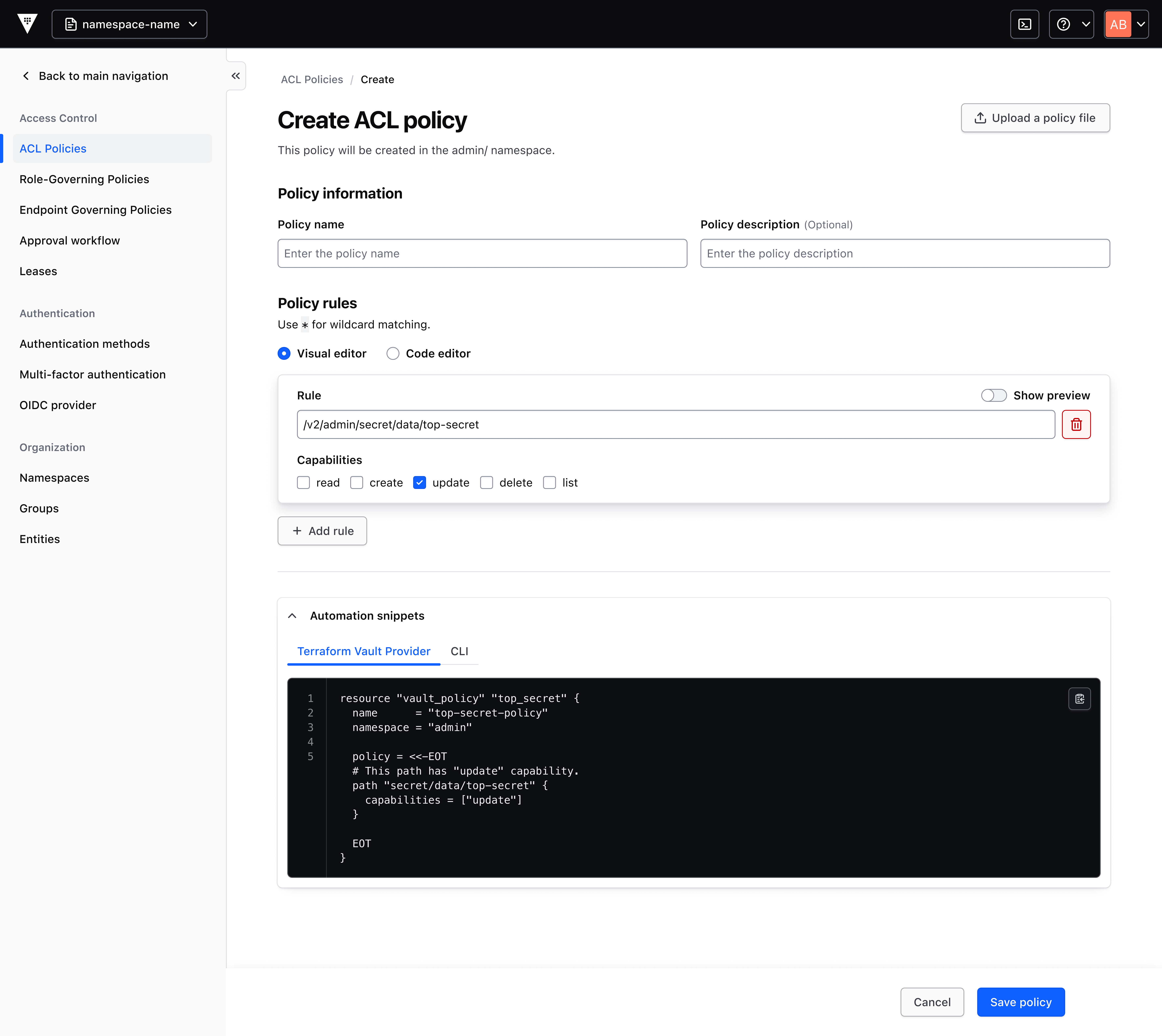
2. Visual Policy Generator – Code Without a Ph.D.
One of the biggest barriers to Vault adoption has been policy creation. New users initially have zero permissions, and writing custom policy code can be daunting. The visual policy generator in Vault 2.0 changes that. It presents a pre-filled, contextual form that generates best-practice policy snippets. Users can copy these snippets for use with the Terraform Vault Provider or save them directly to the cluster. This tool dramatically reduces the operational burden on administrators and encourages feature adoption by removing the coding hurdle.
3. Onboarding Wizard – From Questions to Code in Seconds
Instead of presenting a blank slate, the onboarding wizard asks simple, step-by-step questions about how you intend to use a feature. Based on your answers, it generates an editable code snippet tailored to your exact use case. This personalized approach helps teams implement Vault according to best practices without needing to pore over lengthy documentation. It’s like having a Vault expert sitting beside you, translating your requirements into production-ready configurations.
4. Introductory Pages That Spotlight Feature Value
Every new and existing feature now comes with a dedicated introductory page. These pages clearly explain the feature’s value proposition and provide a recommended quick-start action. Whether you’re exploring secret rotation, dynamic secrets, or identity brokering, you get immediate context on why you should use it and how to begin. This approach transforms Vault from a black box into a guided experience, lowering the barrier for teams to expand their secrets management footprint.
5. Revamped Navigation Centered on Customer Problems
The Vault 2.0 navigation bar has been completely reorganized. Instead of grouping features by technical category, it now clusters them around common customer problems. For example, you might find “Secure Application Access” or “Automate Key Rotation” as top-level menus. This problem-centric layout makes it easier to discover the right tools for your specific challenge, rather than requiring you to know Vault’s internal taxonomy. It’s a user experience improvement that directly boosts productivity.
6. Enhanced Reporting and Consumption Visibility
Vault 2.0.1 introduces improved reporting dashboards that give teams clear visibility into how Vault is being consumed. These dashboards cover secrets management, key lifecycle, identity brokering, and data protection. With granular consumption data, you can see which teams are using which features, how much they’re using, and where bottlenecks exist. This transparency supports operational oversight and helps justify scaling decisions or resource allocation.
7. Smarter Forecasting and Planning with Usage Insights
The new reporting capabilities extend beyond mere tracking. By analyzing usage patterns over time, Vault 2.0 helps organizations forecast future needs. You can plan for capacity upgrades, predict license or subscription tier requirements, and identify underutilized features that might be retired or consolidated. These insights are invaluable for IT leadership looking to optimize costs and ensure that Vault scales seamlessly with business growth.
8. Governance Made Simple Through Improved Visibility
Security and compliance teams often struggle with auditing secrets usage. Vault 2.0’s enhanced reporting provides a clear, auditable record of who accessed what and when. This transparency simplifies governance initiatives, such as proving compliance with regulations like SOC 2 or PCI-DSS. Teams can quickly generate reports for internal audits or external regulators, reducing the time spent on manual evidence gathering. The result is a stronger security posture with less administrative overhead.
9. Best Practice Implementation Without the Manuals
A key pillar of the Vault 2.0 UI enhancements is helping customers adopt features using best practices right out of the gate. The visual policy generator, onboarding wizard, and contextual prompts all nudge users toward recommended configurations. For example, the policy generator suggests least-privilege principles by default. This built-in guidance ensures that teams don’t accidentally create overly permissive policies or misconfigure secrets engines. Vault 2.0 essentially bakes security expertise into the interface.
10. A Continuous Improvement Mindset for Future Releases
The enhancements in Vault 2.0 are just the beginning. HashiCorp, an IBM company, has committed to an ongoing cycle of usability improvements based on customer feedback. The streamlined onboarding and reporting capabilities set the stage for even more intuitive features in upcoming versions. By adopting Vault 2.0 now, organizations position themselves to benefit from every future update without needing to overhaul their workflows. It’s a forward-looking investment in seamless secrets management.
In summary, IBM Vault 2.0 transforms secrets management from a niche specialty into an accessible, transparent component of your security operations. With intuitive onboarding, visual policy creation, problem-centric navigation, and deep consumption insights, teams can adopt best practices faster and gain the visibility needed to govern effectively. Whether you’re a Vault novice or a seasoned administrator, these ten features make Vault 2.0 a compelling upgrade that delivers immediate value.