Web Dev Discoveries: HTML in Canvas, Hex Maps, E-Ink OS, and CSS Image Swaps
Welcome to another roundup of cutting-edge web experiments and techniques. This edition covers a revolutionary API that brings real HTML into canvas, a hexagonal world map analytics retrospective, a web-based OS designed for e‑ink devices, and a clever CSS trick for swapping image sources. Dive into each topic below.
How does the HTML-in-Canvas API work and what can it do?
The HTML-in-Canvas API is the latest buzz among developers, allowing you to render real, semantic HTML inside a <canvas> element with full visual effects. Developer Amit Sheen demonstrated its mechanics and built a showcase called the HiC Showroom, featuring interactive demos. To test it yourself, you need Chrome 146 with the chrome://flags/#canvas-draw-element flag enabled. The API essentially bridges the gap between the static canvas bitmap and the dynamic DOM, enabling rich, interactive graphics that retain accessibility and styling. This opens up possibilities for game UIs, real‑time data visualizations, and design tools that were previously cumbersome or impossible with pure canvas.
What insights does Ben Schwarz share about building a hexagonal world map analytics feature?
In a retrospective article, Ben Schwarz (no relation to CSS legend) walks through the creation of a hexagonal world map–analytics feature. Though not a step‑by‑step tutorial, it’s a fascinating look at the interplay between analytics, design constraints, inspiration, and engineering. The project relies heavily on SVG and CSS to draw hexagons representing geographic regions. Ben explains how they navigated performance challenges and visual clarity issues to produce an interactive map that displays analytics data. The design constraints—like keeping hexagons uniform while preserving recognizable landmasses—drove many creative compromises. This retrospective is a valuable case study for anyone building data‐heavy, geometry‑based interfaces.
What is Rekindle and how does it optimize for e-ink devices?
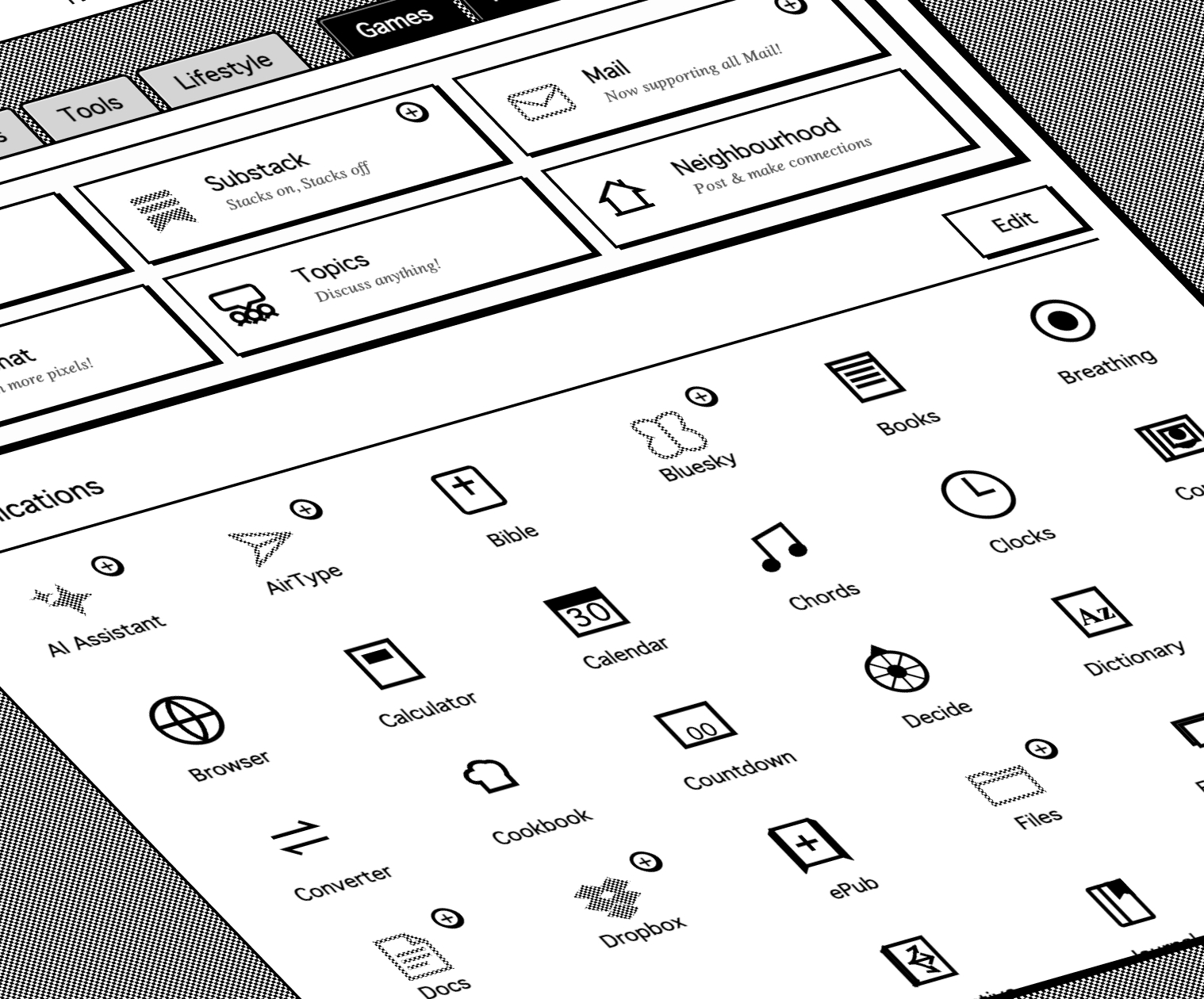
Rekindle is a web‑based operating system tailored for low‑power e‑ink devices such as Kindle, Kobo, and Boox. It packs an impressive array of features and apps, all designed in black‑and‑white with zero animations to suit the display’s strengths and limitations. The system is built entirely with web technologies, making it lightweight and portable. However, its existence underscores a gap: the proprietary browsers on these devices often lack support for modern CSS media queries that could natively optimize content for e‑ink. Rekindle works around this by using a custom rendering engine—essentially a web app that handles everything. While not a deep technical dive, the project raises the question of whether dedicated e‑ink media queries will ever see mainstream adoption.
What media queries are available for e-ink optimization, and why aren't they widely used?
Media Queries Level 5 define several properties that would be perfect for e‑ink displays: hover capability, pointer precision, display update frequency, color depth, monochrome bit‑depth, color index size, and dynamic range. In theory, developers could use these to tailor experiences—like disabling animations or switching to high‑contrast modes. In practice, however, the browsers shipped on e‑ink readers are often versions of WebKit or Blink that are several years old, lacking support for these modern queries. This forces projects like Rekindle to build their own optimization layer. Until device manufacturers update their browsers, or e‑ink readers adopt more capable engines, the full potential of these media queries remains untapped. The situation is improving, with ongoing development on both fronts.

How can CSS replace img src attributes using the content property?
Developer Jon discovered a surprising CSS trick: you can change the src of an <img> element by setting the content property in CSS. For example: img { content: url(new-image.png) / "New alt text"; }. This works without any pseudo‑elements and appears to be supported by all current browsers. The content property has been Baseline for over 11 years, yet this particular use case flew under the radar. It’s especially useful for theming, responsive images, or A/B testing—where you want to swap images without altering the HTML. Note that the alt text must be provided via the CSS alt syntax (the part after the slash) to preserve accessibility.
Does the CSS content property trick work with image-set() and what are the implications?
Yes, the content property can also pair with the image-set() function, enabling responsive image replacement directly from CSS. For instance: img { content: image-set(url(photo-1x.png) 1x, url(photo-2x.png) 2x) / "Alt text"; }. This allows you to serve different resolutions or formats based on device pixel ratio without touching the HTML. The combination is powerful: it keeps the markup clean and allows designers to control image assets from a single stylesheet. However, developers should be cautious—overriding src with CSS can confuse screen readers or cause unexpected behavior if not tested thoroughly. Still, it’s a handy tool for modern responsive design.